Your business. Your kingdom.
Build your online business.
One quest at a time.
An online business, with a clear next step. Turn your goal into quests, put your AI team to work and review the results. All inside your own RPG kingdom. Start from an idea, or bring the business you already run.
You are the King. Your team does the work you approve.
Join the early-access waitlist. Just your email.
Explore the Kingdom · Interactive product preview

Start
Big idea? Small start.
An idea, a business you already run, or still exploring. There is room for you here. Join the waitlist with just your email; set up your business when you get access.
- I have an ideaTurn a skill, hobby or ambition into your first business. Join the waitlist.→
- I already have a businessBring what you run and give your team a clear next quest. Join the waitlist.→
- I’m still exploringYou don’t need a business idea to join the waitlist.→
What happens when you join
Available now Email-only waitlist. Guided business setup happens inside the app after you get access. Not yet Open sign-up and pricing.

01 / Your next move
Your goal.
A clear way forward.
Give your ambition a direction. Start with a suggested plan, make it your own and keep the next important task in sight.
Example · Reelcraft, your first content studio
- Shape your first offerStart here
- Create a portfolio sampleShow what you can do
- Find your first clientTest the offer with real people
“I like making videos. How could I turn that into a business?” Start with an audience, a clear offer and one sample to make first.
! Marketing Wizard · waits for your approvalSee the next quests
About this preview
For invited members Starter plan and proposed quests from your answers (fixed wording, not model output). In development A recorded main quest; today it is the most urgent open quest on your active milestone.

02 / Assemble your team
You lead.
You do not work alone.
Connect an AI provider, then give each role a clear job. Plan a product, shape your offer or draft your next campaign. One connection can support the whole team.
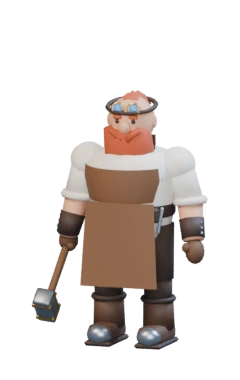 BuildShape your product
 DesignMake it clear
 MarketingTell your story
Example · nothing is entered or stored here
Providers, costs & limits
- Supported providers Anthropic, OpenAI-compatible or OpenRouter. Your provider bills your key.
- Daily allowance runs and tokens per business, not money. Default 5 runs and 60,000 tokens a day; you set it.
- Text drafts only no tools, no browsing, nothing sent or published. A ChatGPT or Claude subscription is not an API key.
- Nothing runs by itself a role only works on a quest you approved, and stops to ask when unsure.
About this preview
For invited members One cloud connection on your key; allowances per business. Local candidate Your Portals connect your AI and tools. Their indicators reflect connected providers in the 3D app; this page uses an example.

03 / From brief to result
Good work starts
with your go-ahead.
A clear brief. A task you approve. A result you can use. Try the example: your Marketing Wizard asks who you want to help, shapes your first offer and brings it back for your review.
Example · runs in your browser, starts no work
!Needs your approvalMarketing Wizard · Wizard’s Tower
Turn my video skills into a first offer
Brief, usage & limits
- Scope
- One audience, one starter offer and one sample brief. Uses your idea, skills and available time. A proposal comes back for review; no clients are contacted.
- Limits
- Counts against today’s allowance for this AI connection. Answering a question or asking for changes uses another run.
- Cost
- Paid to your AI provider on your own key. QuestDesk records the usage the provider reports.
Nothing starts until you press Approve. Approval binds to this brief; edit it and it needs approval again.
Reading your idea, skills and available time.
Who would you like to create videos for first?

Inside the Wizard’s Tower
See the work.
Keep the control.
Who is working? Who needs an answer? What is ready to review? Your Kingdom brings it together, so the next decision is easy to find.
- Marketing Wizard · Cloud, your keyWorking · Shape your first content offer
- ?Marketing Wizard · Cloud, your keyNeeds your answer · Fitness coaches or independent shops?
- Marketing Wizard · Cloud, your keyResult to review · Three short-form sample concepts
- Marketing Wizard · Cloud, your keyReady for the next quest
About this preview
Example Illustrated runs within the Marketing team. Other roles have their own stations. In development The 3D app uses these same buildings and workers. This page uses example work, not live agents.

Room to grow
An offer is a start.
Now make it real.
Your Designer shapes a portfolio. Your Builder plans the page. Your Marketing Wizard drafts the first sample. Each role gets a clear quest, and every result comes back to you.
Planned · how a suggestion would look
Quest · Create your first portfolio sample
The next step: a 20-second reel that shows your offer in action. Today: get a shot list and caption draft, then make the sample with your own footage and editing tools. Our direction: connect video tools and bring the finished media back to the quest.
About this preview
Today QuestDesk connects your model key and drafts text. Video generation, publishing and social posting are not self-service connections yet; a quest tells you what to do by hand.

04 / Grow through completed work
Make progress.
Watch it take shape.
Finished work should feel rewarding. Our progression design turns accepted results into stronger stations, new levels and a Kingdom that tells your story.
Demo comparison · your Castle at four tiers. Never changes XP or levels.
Your Castle · Lv 20 · Guild Master. The beginnings of a citadel.
How progress is earned
- +40 Worker result accepted after review
- +30 Your own recorded result accepted
- +15 Accepted after a real change-request round
- +150 Milestone achieved with evidence
- Starts, approvals, answers, worker activity and spend award nothing.
About this preview
For invited members These XP rules and levels per business. In development The 100-level curve and per-station buildings.

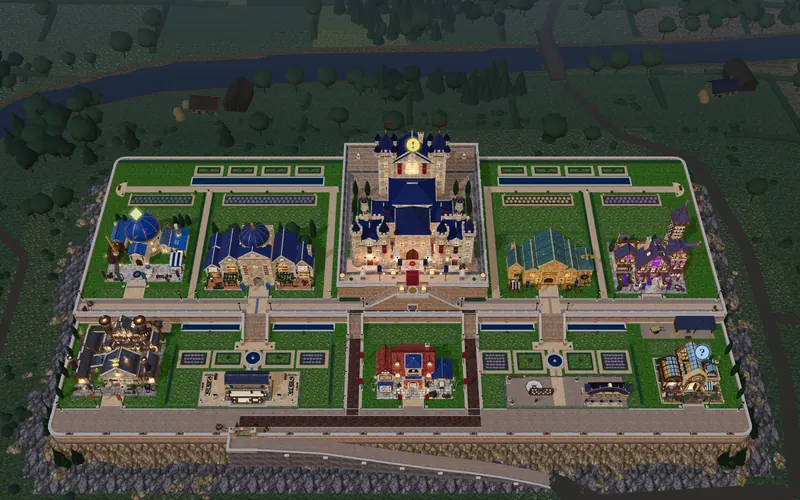
Illustrative future Kingdom
Look at what
you have built.
Imagine all eight stations at level 100: Mythic. This is an illustrative future state, not your current progress or a promised timeline. Explore the Kingdom and check its work status in a compact list.
| Station | Level | Example work state |
|---|---|---|
| Your HQ | 100 | 1 to approve |
| Marketing | 100 | 1 to review |
| Build | 100 | 2 working |
| Design | 100 | 1 question |
| Knowledge | 100 | No action now |
| Operations | 100 | No action now |
| Finance | 100 | No action now |
| Vision | 100 | No action now |
- Your HQLv 100
- MarketingLv 100
- BuildLv 100
- DesignLv 100
- KnowledgeLv 100
- OperationsLv 100
- FinanceLv 100
- VisionLv 100
About this preview
For invited members Work status, levels per business, one Kingdom per business. In development Per-station levels and this 3D overview.
Roadmap
See where your Kingdom is heading.
QuestDesk opens in stages. Early members step in first, and what they tell us shapes what comes next.
-
Stage 1 · You are here
Waitlist open
Early access
Join with just your email and help shape QuestDesk. We invite people from the waitlist as places open.
-
Stage 2
Preparing early access
Your first working Kingdom
Bring an idea or the business you already run. Set a goal, connect a supported AI provider and follow one clear main quest to work you can review.
-
Stage 3
Next
A team that moves your business forward
The King’s Hand, your planning adviser, plans with you. Specialist workers take on the quests you approve, share context and results, and ask you questions in Guild Chat, one shared thread. You stay in control from one place.
-
Stage 4
Next
Create, market and grow
Turn finished work into content and campaigns with the creative and marketing tools you connect, and see insights that link your goals, the work and the results. You review and post everything yourself.
-
Stage 5
Later
A Kingdom that grows with you
Building upgrades and gear you earn as your business grows, workers you can watch at their real tasks, and a better way to check in from your phone.
Today you can join the waitlist. The Kingdom and examples on this page preview a product in development. Stages have no fixed dates, and their order may change with what early members need.
What the first invited members use today
- Guided setup: a goal and a starter plan with proposed quests
- Approval before any quest starts, bound to the brief you read
- One cloud AI connection on your own key, with daily allowances per business
- Worker questions and text drafts you accept or send back with changes
- XP only from accepted results and milestones with evidence
- A Kingdom overview and work status over the same records

Begin
Your idea deserves
a first chapter.
Leave your email to join the early-access waitlist. We will let you know when you can step into your Kingdom.
Already invited? Sign in.